Cruise Control
Moto Guzzi Quota 1000 and Quota 1100 ES models
I installed an electronic cruise control on my Quota. It works well, holds the chosen speed for an entire tank of gas, and makes interstate travel much more pleasurable. Here is what I did.
First, I did a little bit of Google research and found some existing information:
- Motorcycle Cruise Control FAQ
- Installing an Audiovox Cruise Control on an FJR1300
- Motorcycle electronic cruise control (Audiovox Model CCS-100 adapted for motorcycle installation)
I started by purchasing a Audiovox CCS100 Universal Vacuum Cruise Control from Amazon (least expensive place I could find it).

Photo courtesy of Audiovox.
Next, I began the task of fitting it to my Quota.
Mounting the control unit
I made a small bracket out of aluminum. The bracket is secured to the handlebar using the existing mirror mount. I cut a hole in the back through which the wires run.
I find the placement convenient. The unit, however, is not waterproof. I need to do some weatherproofing as it will stop working in the rain.

Photo courtesy of Gregory Bender.

Photo courtesy of Gregory Bender.

Photo courtesy of Gregory Bender.
Connecting the cable to the throttle body
Using one of the brackets that came with the kit, I secured the cable housing to one of the bell housing bolts. Then, using the ball chain from the kit and one of the adapters, I connected the cable to the part on the throttle body that rotates with the existing throttle cable. I secured the end of the adapter to the throttle through an existing hole using a small (5 mm, I think) bolt. If memory serves, I did not have to alter the part on the throttle body at all.

Photo courtesy of Gregory Bender.

Photo courtesy of Gregory Bender.

Photo courtesy of Gregory Bender.

Photo courtesy of Gregory Bender.
Connecting the vacuum hoses
The vacuum hoses are connected to each intake port. Then, they are joined together under the saddle with a T
connection. From there, I have installed a one-way valve (simple, Positive Crankcase Ventilation or PCV device). The hose then runs to a fitting on my homemade vacuum tank. Finally, a hose connects my homemade vacuum tank to the vacuum operated cable actuator that came with the kit.
At the intake ports, I used a pair of hose adapters from my existing stash of parts.
For the T
connection, I used one of the T
connectors that came with the kit.
For the PCV valve, I picked up something cheap and small off the shelf from my local auto parts store.
For the vacuum tank, I simply purchased a short length of 2 inch plastic pipe and two end caps. After drilling and tapping the holes in the end cap for my brass, 1⁄8 inch NPT, barbed vacuum hose connections, I screwed in the brass vacuum hose connections (using teflon tape on the threads) and glued the end caps onto the pipe. I used the largest diameter pipe in the longest length that would fit in the same I had. The goal here is to have the largest vacuum tank possible.

Photo courtesy of Gregory Bender.

Photo courtesy of Gregory Bender.

Photo courtesy of Gregory Bender.

Tconnection. Installing a cruise control on a Moto Guzzi Quota 1100 ES.
Photo courtesy of Gregory Bender.

Photo courtesy of Gregory Bender.

Photo courtesy of Gregory Bender.

Photo courtesy of Gregory Bender.
Mounting the magnetic speed sensor
The manual that comes with the kit is not all that great and is a bit confusing on a number of issues. The only way I could get the cruise control to work was to hook up the magnetic speed sensor to the rear wheel. I simply could not make it work using a pick-up from the coil.
I made a small bracket out of steel and mounted it to the swing arm. I chose steel - instead of aluminum - because I did not want a stress related failure that might cause parts to become lodged in the rear wheel or brake.
I epoxied two magnets onto the brake rotor (180° apart). For magnets, I used cheap but strong, circular magnets from Walmart. For epoxy, I used Duco brand cement (also available at Walmart).

Photo courtesy of Gregory Bender.

Photo courtesy of Devcon.
Gregory Bender's thoughts:
The cruise control worked perfectly for several years, then one day stopped working. It was an interesting experiment and very useful for interstate travel, but I've not bothered to repair it.
Installing an Audiovox Cruise Control on an FJR1300
Credit
Copyright © 2003, by H. Marc Lewis and Arlen Bloom. All rights reserved. On Arlen Bloom (aka Amain) from the FJROwners online forum provided the following text and photos describing how he added an Audiovox cruise control to his FJR1300.
Since Arlen's original article is no longer available at the original location (http://www.fjr1300.info/howto/audiovox.html), and I cannot find it anywhere else, I am reproducing it here. Should Arlen wish for me to remove it, I will happily do so. However, I find his article excellent and I believe it needs to continue to live on.
While a throttle lock or palm rest is a sufficient solution to a cramped throttle hand for many, some riders are looking for the ultimate solution that also adds the luxurious comfort of an automotive cruise control. Audiovox offers an affordable product that fits the bill nicely. It is way less than impossible to install and the end result has put mile-wide grins on the faces of many riders willing to invest a little time. The pictures and commentary here will make this a weekend project for you that will have you cruising down the road with your right hand in your pocket and you will wonder why you waited so long to make this modification. So let's get started!
SAFETY WARNING
This modification, if improperly done, can be life-threatening. If you know how hard the FJR can accellerate, you know that you only want it doing that when you intend it to. If you are not extremely careful in performing this modification, the throttle could inadvertantly open at an inappropriate time, potentially resulting in a crash and/or injuries.
What's In The Box
The Audiovox CCS-100 comes with an instruction booklet that is less than user friendly and lots of miscellaneous parts you won't use because the kit is designed for installation in a car instead of a motorcycle. It also includes a servomotor which will control the throttle operation, a compact control pad which mounts to the handlebar or fairing to manually control the servo motor, and all the vacuum hoses and wiring to connect the parts to make an automatic cruise control.
Let's get this show on the road and prepare the bike for this installation by removing the right side cover and gas tank. Undoing all those hoses and wires attached to the gas tank isn't as scary as it looks and makes it much easier to see the throttle assembly area where the most tedious part of the installation takes place. In fact, you will also want to remove the fuel rail to create even greater access to the throttle assembly. It is not necessary to drain the gas tank before removal.
Installing the Servo Motor

Photo courtesy of Arlen Bloom.
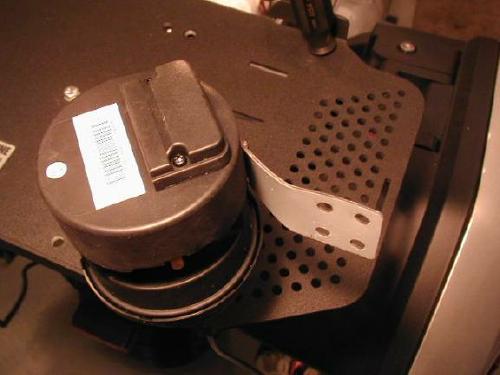
Photo courtesy of Arlen Bloom.
Look inside at the printed circuit board and notice a small black square of plastic that serves as a configuration jumper. It can be found at one end of the 7-position switch pack. Take the jumper off its 2 pins and turn it 90 degrees and place it back on either pin. This tells the unit it is being installed in a vehicle with a manual transmission.
Let's program the switch pack.
- To set the Pulses Per Minute for the necessary manual transmission rate of 4000, set Switch 1 to ON and Switch 2 to OFF.
- Set the Speed Signal for Tach Only by moving Switch 3 to OFF.
- Set the Sensitivity to LOW for light vehicles with high horsepower by moving Switch 4 to ON and Switch 5 to OFF.
- When using the included Control Pad, set Switch 6 to OFF.
- Tach Source Select is for a coil connection; set Switch 7 to ON.
Now find the large wiring harness and attach it to the keyed 10-pin connector. Lay the wires flat before replacing the plastic cover which will weatherproof the switch pack and harness connection.
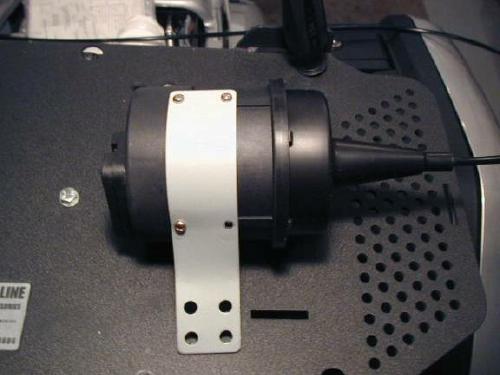
Photo courtesy of Arlen Bloom.
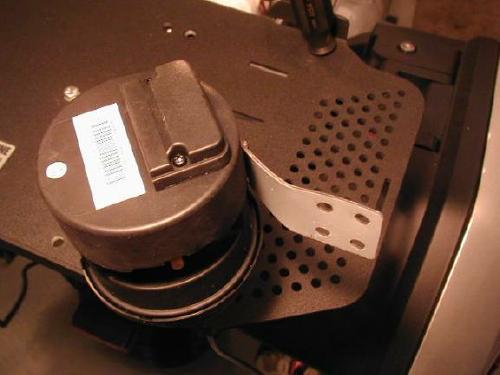
Photo courtesy of Arlen Bloom.
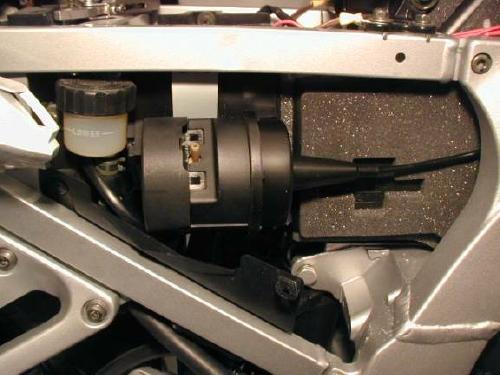
Photo courtesy of Arlen Bloom.
Vacuum Canister
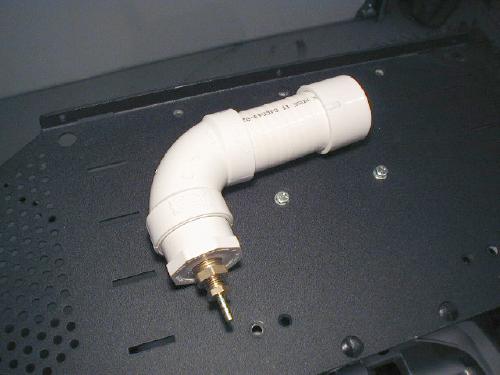
Photo courtesy of Arlen Bloom.
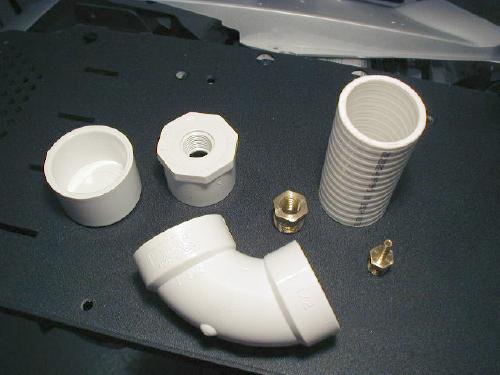
Photo courtesy of Arlen Bloom.
You will need the following parts not included in the kit:
- 1 1⁄2 inch PVC end cap
- 4 inch length of 1 1⁄2 inch PVC pipe (I used the more expensive Spa Hose, but plain pipe is fine.)
- 1⁄2 inch PVC 90 degree Elbow
- 1⁄2 inch PVC to 3⁄8 inch threaded fitting
- PVC pipe adhesive
- Teflon pipe thread tape
- 3⁄8 inch male to 1⁄4 inch female brass fitting
- 1⁄4 inch male to 3⁄16 inch rubber hose brass fitting

Photo courtesy of Arlen Bloom.
Sand all PVC mating surfaces with coarse sandpaper and glue it all together with a coating of adhesive. After assembling each glued joint, give it a 1⁄4 turn twist to make a more positive seal. Use the Teflon tape to make a couple rounds of each brass fitting thread and wrench the fittings together until they are snug.
The vacuum canister can now be tie-wrapped below and behind the servomotor (using any method you are comfortable with) and is ready to have the vacuum hoses connected.
Vacuum Hose Connections
Now make a run to your local auto parts store to buy a couple of vacuum fittings. You will need a 3⁄16 inch × 3⁄16 inch 90degree plastic vacuum hose fitting and a Two Port Check Valve that also has 3⁄16 inch hose connections.
Cut a short piece of the 3⁄16 inch rubber hose included in the kit just long enough to attach the 90degree fitting to the hose nipple on the servomotor and make the connection.
Cut two pieces of hose long enough to facilitate the connection of the servo and the vacuum canister to the two hose nipples on one end of the Two Port Check Valve. Make the connections, then use the remaining length of hose to route along the servo cable to the engine compartment below the gas tank. Use a small tie-wrap on each hose connection for a good seal and to secure the hose.
Connect the vacuum hose you ran into the engine compartment to one of the vacuum ports that is used in the throttlebody synchronization procedure and plugged with a rubber cap.
Throttle Connection

Photo courtesy of Arlen Bloom.

Photo courtesy of Arlen Bloom.

Photo courtesy of Arlen Bloom.

Photo courtesy of Arlen Bloom.

Photo courtesy of Arlen Bloom.

Photo courtesy of Arlen Bloom.
Control Pad Mounting

Photo courtesy of Arlen Bloom.

Photo courtesy of Arlen Bloom.
Bolt the 2 bracket pieces together with a 1 inch 10-24 machine screw and put a nylock nut on it. Drill a 7⁄16 inch hole down through the edge of the bracket for the 10 mm mounting bolt. Bolt length will vary depending on what else you have mounted with this bolt. I also have heated grips and a GPS mounted here. The large hole you see here allows the wires to poke through and the control pad will adhere flat to the bracket.

Photo courtesy of Arlen Bloom.

Photo courtesy of Arlen Bloom.

Photo courtesy of Arlen Bloom.
Wiring

Photo courtesy of Arlen Bloom.
This plug has the Brown and Yellow wires that go to the brake light. Use black vinyl tape to tie the Red and Purple wires to the harness and the excess will be doubled back along the harness and stored inside the convoluted harness protector. I would rather store the extra wire than cut it off and need more at a later time. Connect the Red wire to the Brown wire at the brown plug and connect the Purple wire to the Yellow wire at the brown plug.

Photo courtesy of Arlen Bloom.

Noise Suppressor - Do Not Removesticking out of the harness protector just in case the diode should need to be replaced someday. It will be easier to find.
Photo courtesy of Arlen Bloom.

Photo courtesy of Arlen Bloom.

Photo courtesy of Arlen Bloom.

Photo courtesy of Arlen Bloom.

Photo courtesy of Arlen Bloom.

Photo courtesy of Arlen Bloom.
Test Cruise
Congratulations! Your cruise control is installed and after replacing all the body plastic and picking up the tools, you are ready for a test ride. Everything should work fine the first time out but if it doesn't, go back and check your wire and hose connections and fuses. Above all, make sure your throttle linkage does not catch or bind. When testing your cruise, be ready to hit the Kill switch to prevent injury should something go horribly wrong. Follow all the instructions included with the kit to supplement these.
Happy Cruisin' !!
Motorcycle electronic cruise control (Audiovox Model CCS-100 adapted for motorcycle installation)
Credit
© 1998 David J. Sproul.
Since Dave's original article is no longer available at the original location (http://www.angelfire.com/il/sproulpage/page13.html), and I cannot find it anywhere else, I am reproducing it here. Should Dave wish for me to remove it, I will happily do so. However, I find his article excellent and I believe it needs to continue to live on.
Disclaimer
(The Audiovox CCS-100 Cruise Control Unit is designed and marketed for use in automobiles and is not intended for motorcycle applications. Therefore, the writer of this article accepts no responsibility or liability for the modifications, adaptations, operation or function of this application, nor accepts any responsibility or liability for any function or failure of any component of the Audiovox cruise control kit or any component of the motorcycle it is installed on. Furthermore, the writer does not guarantee the adaptability of this kit to any particular motorcycle. The writer has no affiliation with Audiovox or any other company, business or brand name that may be mentioned in this article.)
This do-it-yourself article does not intend to address applications to all brands or styles of motorcycles, but rather addresses general modifications and installation tips that are adaptable to just about any application. These tips may also be applicable to other brands and styles of cruise control kits. If you have reasonably good mechanical aptitude and problem-solving and fabrication abilities, this installation should present no problem to you. If you feel that you do not have these skills, perhaps you should consider a commercially available motorcycle cruise kit. In addition to the general instructions, an installation example addendum has been provided on a Honda Valkyrie.
- Approximate total cost: USD $120.00
- Approximate time required: 4-8 hours
Problem
While there are electronic cruise control kits commercially available for a variety of current motorcycle applications, there are two problems. First is the cost, typically around USD $350.00 - USD $400.00, not including installation. Second, not all bikes are covered in the available applications, particularly older models. The aforementioned commercial motorcycle
cruise control kits are basically automobile kits adapted for motorcycle use.
Solution
The solution is to adapt a readily available, inexpensive automobile cruise control unit yourself, saving a substantial amount of money and also having the ability to add electronic cruise to older bikes. The Audiovox CCS-100 Cruise Control with CCS-201 Dash Mounted Control Switch is perfect for this application, is available at most major auto accessory/part stores and sells for around USD $100.00.
Advantages of this System
- Low cost
- Small, high quality, lighted switch box
- No magnetic speed sensor required
- Self-contained, programmable electronic servo unit (no additional electronic
brain
box) - Over-rev protection circuit built-in (no need for clutch cut-out switch)
- Does not require moving or re-routing throttle cables (in most cases)
- Safe, reliable and accurate operation (if properly installed and adjusted)
Disadvantages of this System
- Requires some custom fabrication of mounting brackets (not difficult)
- Requires additional vacuum storage canister (not difficult or expensive to make)
- Servo unit is a little on the large side and somewhat
ugly
(function over form)
Still Interested? Read On...
Description of Audiovox CCS-100 Cruise Kit
The kit consists of two major components:
Switch box - Approximately 2 inch wide, 1 1⁄2 inch high, 1⁄2 inch thick. Grey plastic housing, soft-touch rubber rocker
switches. Lighted. Mounts using double-sided foam tape.

Photo courtesy of Dave Sproul (enhanced by Gregory Bender with Gemini AI).
Servo unit - Approximately 6 inch long, 4 inch diameter. Black plastic housing. Grey steel mounting bracket. Servo unit includes the programmable electronics and mechanical servo actuator. Unlike some older aftermarket cruise control kits, there is no separate control brain
box. See photo #1.

Photo courtesy of Dave Sproul (enhanced by Gregory Bender with Gemini AI).
Other components consist of the wiring harness, miscellaneous brackets and cable adapters.
This unit is ideal for motorcycle application due to it's programming abilities, small convenient switch box and self-contained servo/control unit.
Modifications to the Audiovox CCS-100 Cruise Kit
(see additional details below)
- The kit comes equipped with a magnetic speed sensor designed to be used to read drive shaft rpm on an automobile. This is not needed and can be cut from the wiring harness and discarded.
-
Custom brackets will need to be fabricated in most cases to mount the servo unit to the bike. Mounting location of the servo unit must consider three factors:
- Secure, rigid mounting to the bike
- Position, direction and length of the throttle cable
- Aesthetics (it's not the nicest looking accessory)
The servo unit would fit inside the left or right pocket of a frame-mounted fairing (like a Vetter) and still allow ample length of the throttle cable. On bikes without a fairing, it will be necessary to mount the servo unit to the frame, engine or transmission in a location that will not interfere with any other component on the bike and allow the throttle cable to reach the throttle linkage on the carbs.
-
The control switch should be mounted in a location that is easy to reach while riding. The handlebar is the best choice. However, the switch box is designed to mount to the dash of a car using double-sided tape. Therefore, a custom bracket will be required to mount it to the handlebar. An example is shown under photo #6.

Photo 6. Photo courtesy of Dave Sproul (enhanced by Gregory Bender with Gemini AI).
-
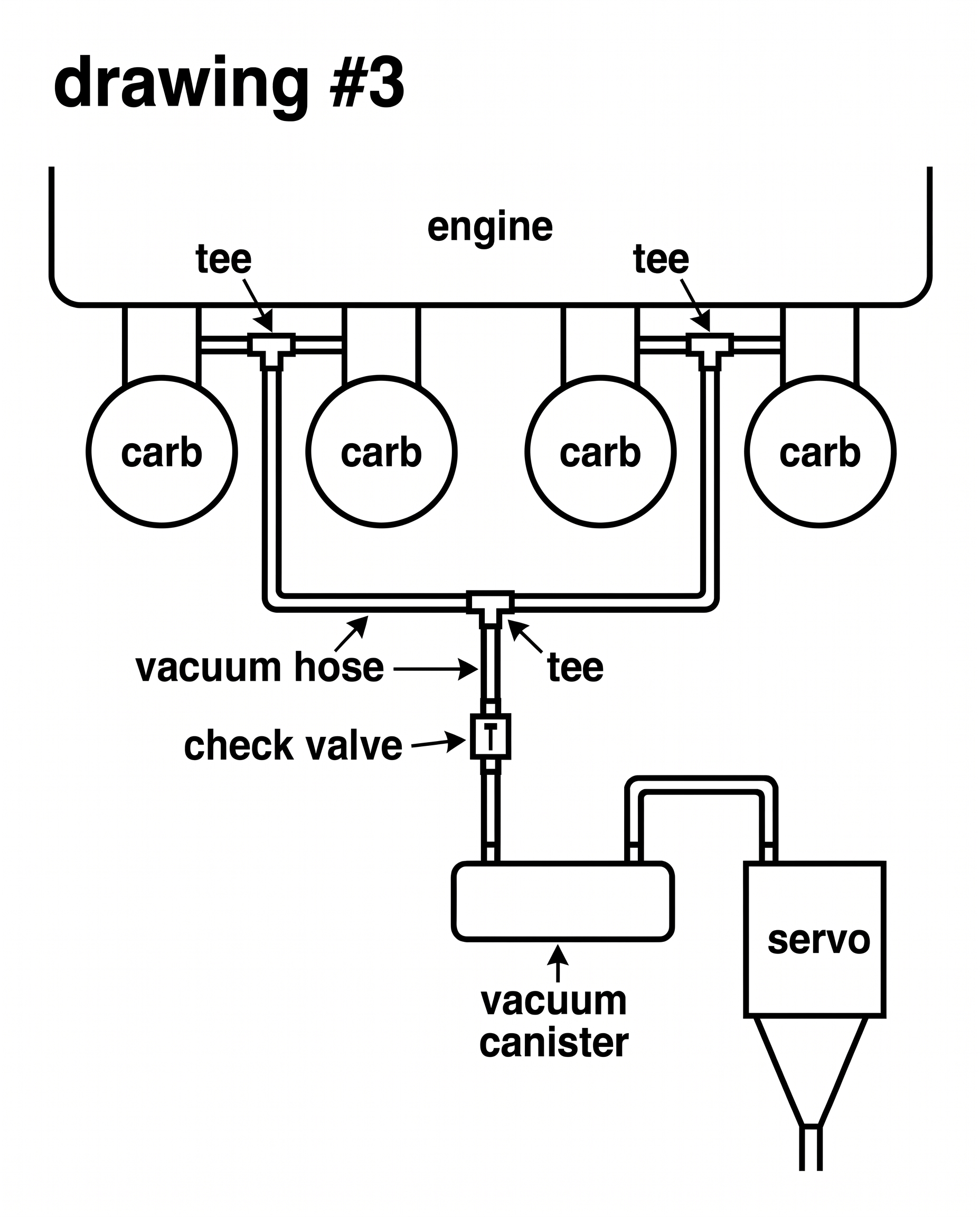
Due to the low level of vacuum available on most motorcycle engines, it will be necessary to add a vacuum storage canister and one-way check valve on the vacuum hose between the engine vacuum source and the servo unit. Vacuum should be drawn from as many cylinders as possible. See drawing #1 for example of an inexpensive homemade canister and drawing #3 for vacuum hose routing diagram. Photo #2 shows a completed and installed canister.

Drawing 1. Photo courtesy of Dave Sproul (enhanced by Gregory Bender with Gemini AI).
Drawing 3. Photo courtesy of Dave Sproul (enhanced by Gregory Bender with Gemini AI).

Photo 4. Photo courtesy of Dave Sproul (enhanced by Gregory Bender with Gemini AI).
- The unit's throttle cable can be used as supplied, but some creative routing may be required and custom brackets may need to be fabricated, depending on application.
Wiring
Some minor alterations to the wiring instructions covered in the Audiovox instruction manual are necessary. Use the following steps as supplemental to the Audiovox instruction manual:
Servo unit:
- Blue wire - Connect to the NEGATIVE side of ONE ignition coil only.
- Grey and Black
pair
wires (magnetic speed sensor) - Remove and discard. - Purple wire - Connect to the brake light wire (make absolutely sure this wire has power only when either the front or rear brake is actuated).
- Red wire - Connect to 12 volt positive source (battery).
- Orange wire - Connect to 12 volt positive switched source (ignition switch).
Control switch:
- Black - Connect to chassis ground.
- Grey - Connect to 12 volt positive switched source (this is for switch lighting). Can use same source as orange wire.
- Other wires from the switch plug into the wire harness connector.
It is highly advisable to include in-line fuse holders where specified by the Audiovox manual. It is also advisable to cut the wires to length once routed to reduce wire bundles. DO NOT remove the noise suppressor on the blue wire. Keep all wires away from the spark plug leads.
Programming the servo
The servo unit is programmed using internal DIP switches. First, remove the small black jumper just below the LED and to the left of the DIP switches. Then, set the DIP switches as follows:
- ON
- OFF
- OFF
- ON
- OFF
- OFF
- ON
NOTE: The DIP switches can be changed from these settings, if necessary, to adjust PPM (pulses per minute) and sensitivity. Refer to the Audiovox instruction manual.
Mounting the servo unit
Choose a suitable location that will not interfere with any controls of the motorcycle and allows for sufficient cable length to reach the carb linkage. In some cases, the supplied mounting bracket can be used. However, other cases may require fabricating a new bracket or an adapter bracket to properly secure the unit. This can be accomplished using steel flat stock, steel angle or aluminum angle. Make sure the mounting is strong and cannot flex to any great degree. A small amount of flex is acceptable. The servo mounting is probably the easiest to do, but can be difficult finding a location that is not obtrusive.
Mounting the control switch
On a bike equipped with a frame-mounted fairing (such as a Vetter unit or factory equipped like on a Goldwing), the switch can be mounted to the fairing as per the dash-mounting instructions in the Audiovox manual. If mounting to the handlebars, it will be necessary to fashion a bracket to attach the switch to. A piece of 2 inch wide aluminum angle or aluminum flat stock is suitable. This can be cut to the size and shape of the switch box and polished if desired. The bracket should be designed to bolt to a secure location on the handlebar within easy reach. In the case of the Valkyrie example, the polished aluminum angle bracket was designed to fasten to a pair of 1 inch Casco rifle scope mounts which then clamp to the handlebar. It can be positioned anywhere on the handlebar. Another possible location is under the left side clutch lever clamp bolt. This would put the switch within easy reach of the left thumb. A little ingenuity is required here, but it is not difficult.
Mounting the throttle cable
This is where it gets a little more difficult. Keep in mind that the cable routing is very important. It must never make less than a 4 inch radius and must terminate in a location suitable for attaching to the throttle linkage on the carb(s). In most cases, the supplied variety of mounting brackets, clamps, etc. will allow proper fastening of the cable housing. In some cases, a custom bracket may need to be fabricated. Refer to the Audiovox manual for mounting examples and ideas.
The attachment to the carb linkage can also be difficult. On the Valkyrie example, there is a connecting link that connects the throttle linkage of the left bank of carbs to the right. The cruise cable was attached to the connecting link simply by drilling one hole in the link. Other bikes may present more of a challenge. Always keep in mind that the cruise cable must in no way interfere with the opening of the bikes throttle cable(s) and linkage. In some cases, it may be possible to attach the end of the cruise cable to the throttle bellcrank on one of the carbs. In other cases, it may be necessary to fabricate and attach a lever to the bellcrank. ALWAYS use the beaded chain attachment method as shown in the Audiovox manual. This allows the cruise cable to go slack
when the bike throttle is manually controlled. Follow the instructions in the Audiovox manual with reference to cable adjustments and operation.
CAUTION! THIS IS EXTREMELY IMPORTANT!
Make absolutely sure that there is no binding or potential sticking of the throttle cable(s), cruise control cable or throttle linkage.
Vacuum storage canister
The larger the canister, the better the operation will be. However, a HUGE canister is really not necessary. Design the canister to fit the available mounting space. PVC pipe works fine for this. Use 1 1⁄4 inch or 1 1⁄2 inch pipe and two end caps. Cut the pipe to whatever length required (6 inch - 8 inch is sufficient) and glue the end caps on using PVC primer and glue. This is the same as assembling plastic water pipe. Then drill two holes in one side or one hole in each end (doesn't really matter) and tap for 1⁄8 inch NPT (national pipe) threads. Clean out all plastic shavings from the drilling and tapping operation. Actually, it is better to drill and tap the holes before gluing the end caps on so the canister can be thoroughly cleaned. Install two brass 1⁄8 inch NPT nipples into the holes. If the canister is going to be visible on the bike, it can be painted to reduce
its visibility. Black wrinkle paint works beautifully for this (Krylon is one brand, available at auto parts stores). Mount the canister in the desired location using black nylon zip ties. If you decide to drill and tap mounting screw holes in the canister to attach a mounting bracket, be sure to use rubber washers and RTV sealant to prevent vacuum leaks. See drawing #1 and photo #4.
Photo courtesy of Dave Sproul (enhanced by Gregory Bender with Gemini AI).
Photo courtesy of Dave Sproul (enhanced by Gregory Bender with Gemini AI).
Vacuum hose connections
Find the vacuum source(s) on the bike. Usually there are vacuum taps located on the intake manifold tubes or boots between the carbs and the engine. It is best to connect to the vacuum ports of as many cylinders as possible. Use 3-way or 4-way plastic vacuum tees to connect all lines into one. Plug this single hose into the one-way check valve (available at auto parts stores as an emissions check valve
) making sure it is connected so as to allow the engine to pull vacuum through the valve. Connect the other side of the valve to one of the nipples on the canister. Connect the servo vacuum hose to the other canister nipple. See drawing #3.
Photo courtesy of Dave Sproul (enhanced by Gregory Bender with Gemini AI).
Operation
The operation of the cruise unit is identical to that of a car installation. The on-off, set, resume, accel, and coast functions all respond exactly the same. Keep in mind that the twist grip of the bike will rotate with the cruise throttle operation just as the gas pedal in a car moves with the cruise. This is a little weird at first, but you get used to it. However, too much hand pressure on the twist grip may prevent the cruise from pulling on the throttle. Typically, the cruise will hold its set speed within 1-2 MPH. A heavily loaded bike may occasionally experience a 4-5 MPH drop on a hill. Long and/or steep hills may cause an even greater drop of 5-10 MPH. This is due to loss of engine vacuum under load and the small storage canister. A little help by manually twisting the throttle slightly will correct the momentary drop in speed and allow the cruise to recover. It is also possible to manually accelerate by twisting the throttle grip at any time. Upon releasing the grip, the cruise will settle back to the set speed. Tapping either brake lever will disengage the cruise. Pushing the resume
button returns the bike to set speed.
The cruise unit is reading engine RPM off of the negative side of the coil that the blue wire is attached to. Since there is no slippage between the engine and the rear wheel (like is possible on automatic transmission cars), engine RPM is directly related to wheel speed. This is why the cruise unit will work without a magnetic wheel speed sensor. In addition to reading RPM to maintain speed, the cruise unit monitors for any sudden increase of RPM at which point it will disengage. This electronic over-rev
protection allows the cruise to disengage if you should happen to pull in the clutch lever while the cruise is set. The engine will rev briefly (about 500-700 RPM) and then the cruise will disengage. Return to set speed by pushing resume
.
Follow-up
If you are the least bit mechanically inclined and do most or all of your own motorcycle maintenance, you will find this installation well within your capabilities. The Audiovox cruise system works very well in this application and, if properly installed, is just as safe and reliable as the same unit installed in a car or truck. The BIG plus is that it is much less expensive than the commercially available cruise units advertised for motorcycles. You do have to design and fabricate a few parts, but overall this is not terribly difficult and allows for a true "custom" installation.
NOTE: Other brands or styles of cruise controls can also be adapted using similar techniques. One example is the Ultra Cruise from Juliano's Hot Rod Parts or Dakota Digital. This kit is more expensive (USD $225.00), but uses an all-electronic control unit. No vacuum hook-ups are necessary.
Enjoy your cruise control and the money you saved!
Parts list
- Audiovox CCS-100 Cruise Control with CCS-201 Dash Mounted Control Switch
- 1 1⁄4 inch or 1 1⁄2 inch diameter PVC pipe, 6 inch - 8 inch long (1)
- 1 1⁄4 inch or 1 1⁄2 inch diameter PVC end caps (2)
- 1 1⁄4 inch or 1 1⁄2 inch diameter PVC coupler (optional) (1)
- PVC primer (1)
- PVC glue (1)
- 1⁄8 inch NPT brass nipple (2)
- One-way check valve (1)
- Extra vacuum hose as needed
- 3-way and 4-way vacuum tees as needed
- Aluminum and/or steel flat stock and/or angle for brackets as needed
- Tasco #797C (or similar) rifle scope mounts (fits 1 inch handlebars only)
- Krylon black wrinkle paint (optional)
Addendum: 1997 Honda GL1500C Valkyrie Installation Notes (Opposed 6 cylinder engine)
The following items must be removed from the motorcycle before starting the installation (refer to the Honda Service Manual for removal and replacement instructions):
- Both side covers
- The plastic cover that goes between the side covers
- Seat
- Fuel tank
- Airbox lid, air filter and the airbox
- Chrome alternator cover
Servo Mount
The best location for the servo on the Valkyrie is between the alternator and the fuel shut-off valve on the left side of the bike. The servo mounting bracket should be bolted to a short piece of 1 1⁄2 inch × 1 1⁄8 inch × 1⁄8 inch aluminum or steel angle, approximately 2-1/2" long. This bracket then bolts to the top mounting bolt of the alternator. It is a snug fit, but there is room. Once installed, the adapter bracket is not visible and the chrome alternator cover can still be removed. See photo #1.
Photo courtesy of Dave Sproul (enhanced by Gregory Bender with Gemini AI).
This location does present a problem with seat removal as the servo unit blocks access to the key lock cylinder for the seat release. The lock cylinder actuates the seat latch via a flexible cable. The solution to this problem is to relocate the lock cylinder and/or the cable. This can be accomplished by drilling a hole in either the left or right side cover, re-installing the cylinder and re-routing the cable. I chose to disconnect the cable and route it up behind the left bank of carbs where I simply attached the cable housing to an existing screw using a small metal cable clamp. Now I can reach under the tank and just pull on the end of the cable. This could reduce security some, but not much as no one would know where the release cable is. Access is actually easier than using the key. See photo #3.

Photo courtesy of Dave Sproul (enhanced by Gregory Bender with Gemini AI).
Throttle Cable Routing
Route the cruise throttle cable under the left bank of carbs (keeping it away from any moving parts), then up through the frame and around the front side of the airbox to the right side, then along the right frame rail (behind the side of the tank) and down between the second and third carbs on the right and continuing into the engine "valley" area under the airbox. There, the housing can be mounted to an existing bolt on top of the engine case. The pull part of the cable can be attached to the flat connecting bar that connects the throttle linkage of the right carb bank to the left. Remember to use the beaded chain attachment method supplied in the Audiovox kit and determine and mark the location of the hole to be drilled in the connecting rod. Make sure the cable will have a relatively straight pull (a little off-angle is OK) and will not bind, catch or rub on any surrounding components. The connecting rod must be removed to drill the hole. This is a little tricky considering the tiny cotter pins used to attach it and that the throttle twist grip must be adjusted
as you do so to get the link off of the attachment pins. Be careful to not lose the small ball bearings that are in the ends of the connecting link. Upon re-installation, again make sure that the cruise cable, chain, screws, etc. do not catch or rub on anything. Operate the twist grip from idle to full throttle while inspecting for any interference. Remember that the cable should never make any bends with less than a 4 inch radius.
Vacuum Canister Mounting
The vacuum canister can be mounted on the right side of the bike just below the ignition switch. A custom bracket can be fabricated to bolt to an existing unused bolt on the side of the engine. See photo #4 for an example.
Photo courtesy of Dave Sproul (enhanced by Gregory Bender with Gemini AI).
Control Switch Mounting
The Valkyrie has 1 inch handlebars, so a 1 inch clamp can be used to attach the switch box adapter plate. I used a pair of Tasco #797C rifle scope mounts and a polished aluminum angle bracket to mount the switch just to the left of the handlebar clamp. See drawing #2 and photo #5 and photo #6.
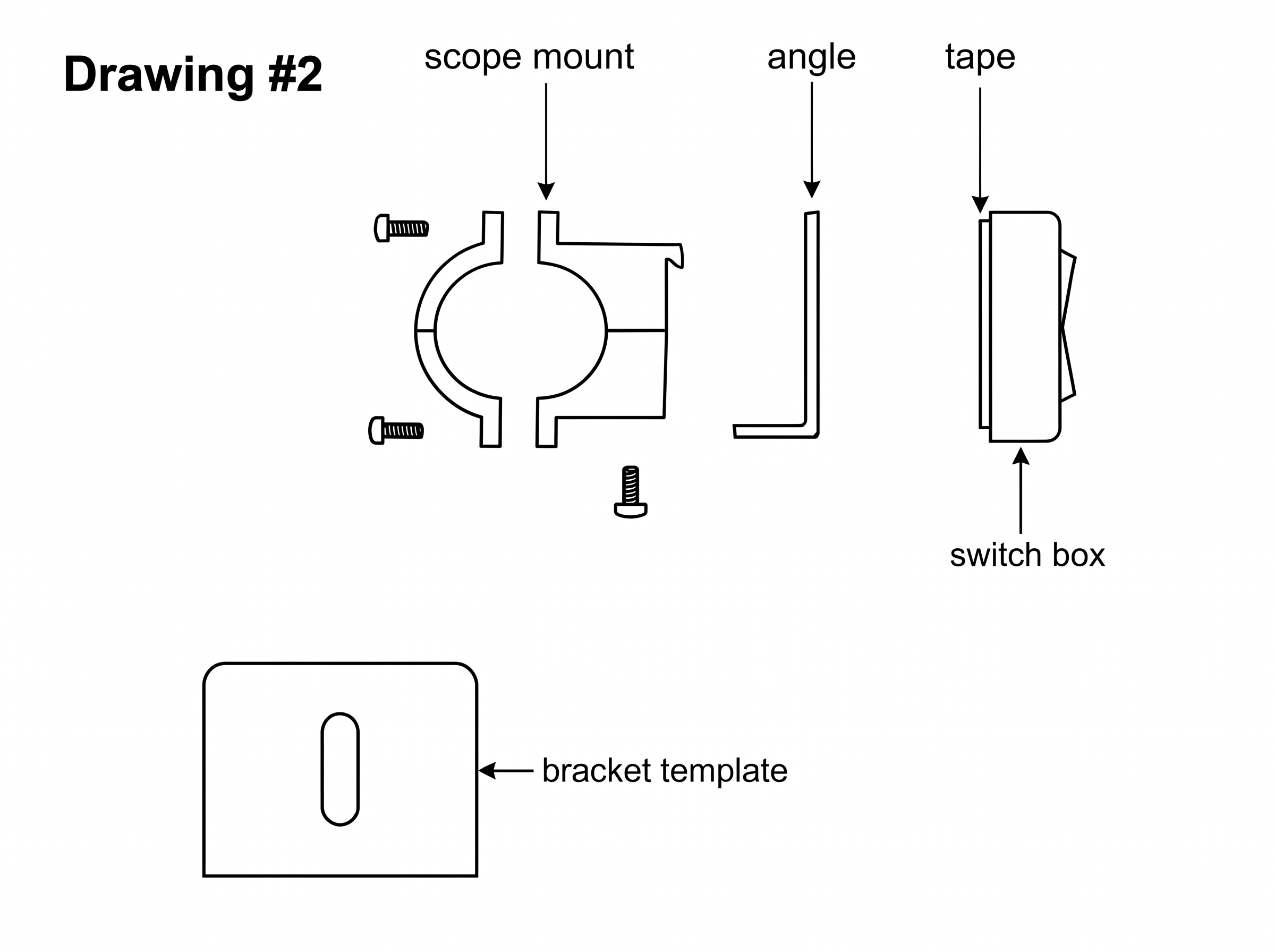
Photo courtesy of Dave Sproul (enhanced by Gregory Bender with Gemini AI).
Photo courtesy of Dave Sproul (enhanced by Gregory Bender with Gemini AI).
Photo courtesy of Dave Sproul (enhanced by Gregory Bender with Gemini AI).
An alternative location would be above, below or next to the left side horn/headlight/turnsignal switch module. This would require a custom bracket designed to fasten to the clutch lever clamp.
Wiring
With the control switch located next to the handlebar clamp as shown in this installation, no modification to the Audiovox wiring is required. Route the wires along the Honda wiring harness under the front of the frame and along the right side back to the fusebox area behind the right side cover. The control switch 4-pin connector will be positioned behind the black plastic cover on the front right side of the frame, just behind the steering head. If the control switch is to be mounted near the left handgrip, it will be necessary to lengthen the wires from the control switch. In either case, it is recommended to cover the exposed wiring with heat-shrink tubing. Plastic electrical tape is NOT recommended. The servo wires can be routed underneath the left side cover, past the front of the battery and into the fusebox area behind the right side cover. Attach wires as explained in the Audiovox manual and the general instructions above. Make sure all wires are protected from chafing. See photo #7.
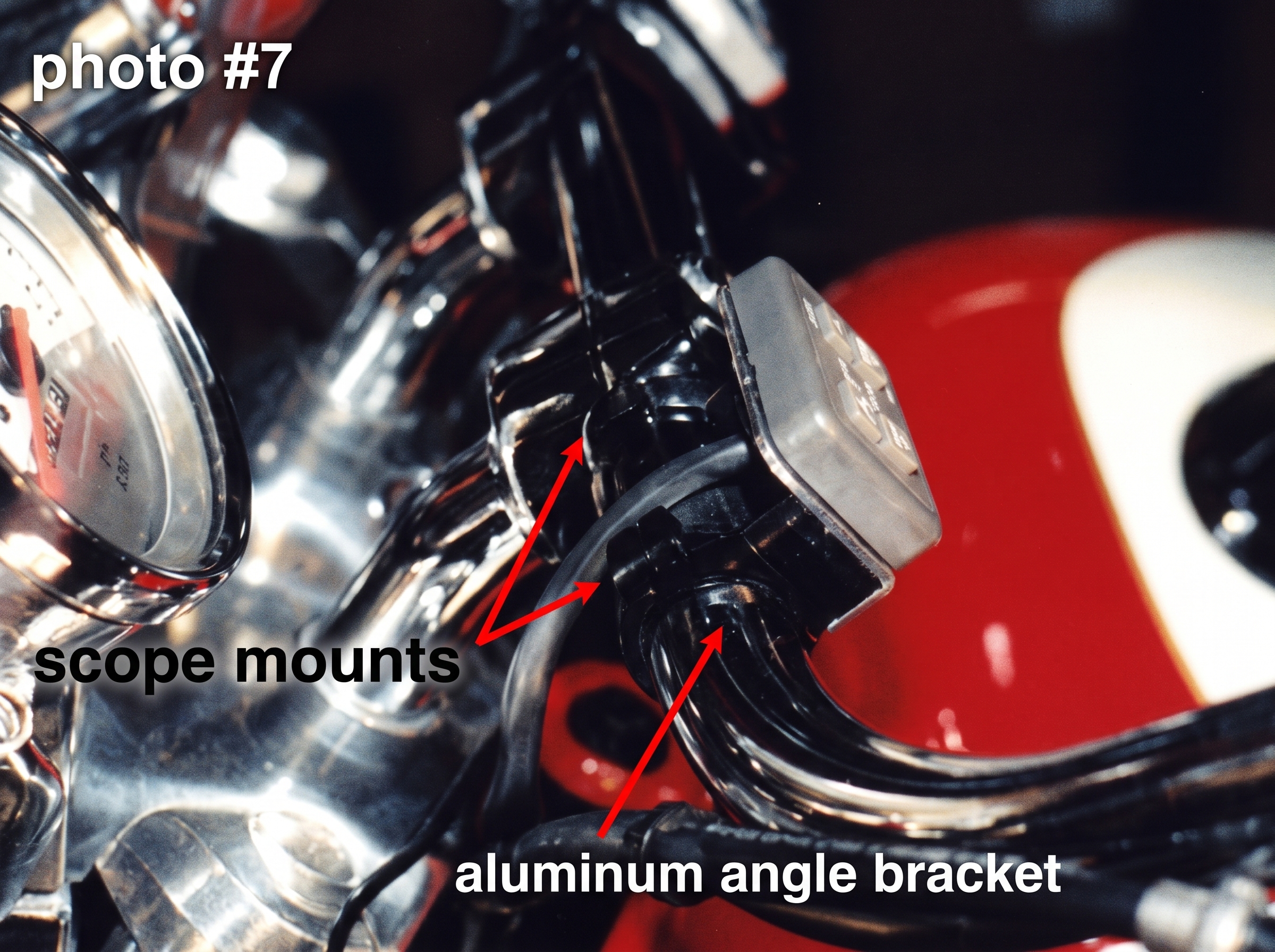
Photo courtesy of Dave Sproul (enhanced by Gregory Bender with Gemini AI).
Vacuum Hose Connections
There are unused vacuum ports on the backside of the chrome intake manifold pipes on three of the six cylinders. Remove the rubber caps and attach the vacuum hoses to these ports, routing them to a 4-way tee. From the 4-way tee, run another hose to the check valve and then from the check valve to one of the ports on the vacuum storage canister and from the canister to the servo. See vacuum hose routing diagram drawing #3.
Photo courtesy of Dave Sproul (enhanced by Gregory Bender with Gemini AI).
If, during testing, the cruise seems to lose speed too easily on an uphill grade, add a fourth vacuum hose by connecting a hose from another cylinder and, using a 3-way tee, splice into the hose BEFORE the check valve.